How To Block A Website On The Home Computer
One day, Mrs. Jane Smith said she is very concerned that her child is spending too much time on some websites like YouTube, Facebook and Orkut. She worried her child wasting more time on the Internet and his doing on these websites. She is concerned that child could be interacting with online predators and even sharing his personal information.
During this time some news reports saying that criminal activities could have been planned on Internet, so Mrs. Jane Smith has finally made up a mind to block access to some websites on the home computer, but how to do it?
Well, Mrs. Jane Smith, We will help you to block access to some websites on the home computer. You need an excellent parental control software, such as
keylogger software, auto shutdown software, and so on. After overall testing, we have picked an excellent
keylogger software, it just is
Screenshot Keylogger. You can download the Kids & Parenting Software from
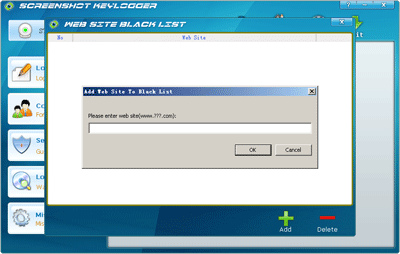
here and install it into the home computer. After compeleted the process of installing, run it, then click on the "Control" button. Click "WEB SITE BLACK LIST" button on the control view, the "Web Site Black List" Dialog has popped up. You can add the url which you want to block it on the home computer to the "Web Site Black List". So good, your child cannot visit the Web Site which has been blocked.